Every feature below is in the app today, on every plan, and included in your free trial (smart ear tags are an add-on we set up with you). New releases arrive automatically, with nothing to install.
Tag, EID, name, sex, class, breed, birth date, dam and sire, group and pen, origin and purchase price, notes. Class changes (heifer to cow, bull to steer) are worked out and logged.
Type the cattle you already own in a grid: born as a date, a year or "18 mo", parents by tag. Nothing is booked as a birth or a purchase. New breeds you type join your list.
Add a calf and the dam is marked as calved. Buy in a load and the purchase posts to the books. Groups carry a ration and move as one.
Treatments with product, dose, reason and withdrawal days. An animal still in withdrawal shows a warning everywhere it appears, and the treatments report is your compliance sheet.
Bull exposures by group with dates, so a calf's possible sires are known until parentage is tested. Calving report by year.
Weigh-ins by date, average daily gain, projected finish date and weight per animal, and an ADG report ranking the feeders.
Registration number, association and registered name on any animal. Keep the pedigree, certificate, health papers or DNA results on the record as a PDF or photo.
Plan kill dates from live head count, hold the animals for a date, record carcass weights and take-home, and invoice the customer from the same screen.
Say it at the chute, review the words later, and they become weights, treatments and notes on the right animals.
Temperature, activity and battery alerts per animal from Bluetooth tags and a reader. $25 a month on any plan; the reader and tags are bought once, no lease.
Recipes by ingredient, sized to your mixer. Pick the groups to feed, nudge for refusals, and the loads are worked out. Groups on the same recipe share a load until it's full.
What was actually fed, by group, against the plan. Pounds per head per day and feed cost per group on a report.
Bunks, bags, piles and bale rows, counted in tons, bales or bags. Harvest in, feed out, corrections logged as shrink, never by editing history.
Harvest by the wagon with pit-scale calibration, by field and cutting. Bought feed comes in with its bill and posts to the books as Feed purchased in the same entry.
Fields with acres, including a one-click import from a John Deere Operations Center export. Tons per acre by field and season, with acre splits when two crops came off one field.
How much silage to chop this fall from live head count, pounds per head, days to carry and shrink. And how long what's on hand will last.
Search USDA's cattle reports by state, town or sale barn, follow the ones you use, and pull the latest feeder prices by weight class. Or enter a barn sheet by hand.
Every sell-heavy, buy-light pair priced as value of gain per pound, green where it beats your cost of gain. Steers and heifers separately.
Feed, overhead and the herd's real average daily gain from the scale, worked into a cost per pound. Set it by hand if you prefer.
Each group valued at today's board from its own weights, with the best sell-buy move flagged.
Income and expense by category and enterprise (cattle, forage, crops, general). Categories and enterprises are yours to edit. Snap the receipt as you enter it.
Year to date and by year, profit by enterprise, cash flow, and a budget to measure against.
Bill freezer-beef customers, mark paid, see who owes you and for how long, and print on your letterhead.
A Schedule F style summary from your categories, tax basis on purchased breeding stock, and a workbook export for your accountant.
Cost per cow per year and cost per steer per day, the two decision numbers, from your own ledger.
Money in and out by vendor or buyer, by year.
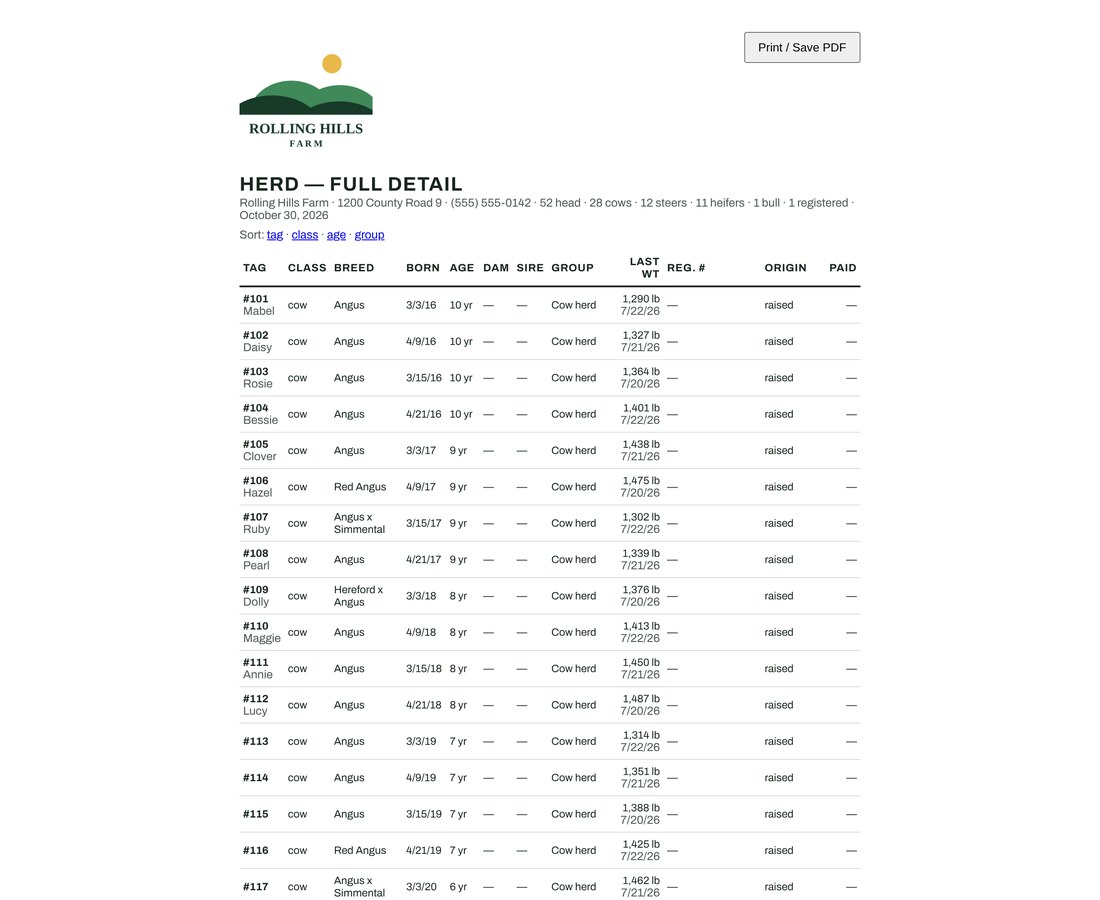
Every report prints on your own letterhead with your logo, from the phone or the desk: herd inventory, full herd detail, rollforward, calving, treatments and withdrawal, gain performance, feed by group, inventory movement, P&L, receivables aging.
Every farm's records carry its farm ID and PostgreSQL row-level security refuses any query that reaches outside your farm. It isn't a setting someone can forget.
Owner, employee and advisor logins. Employees never see money. You manage your own crew's logins and can read the sign-in history.
FarmerTrack staff can only open your farm through a logged support session with a written reason. You see the log, and you can turn support access off.
Encrypted nightly backups kept off-site. And a full export of every table to Excel whenever you want it. If you leave, you get a final copy.
Upload your logo once. It shows in the app and prints on every invoice and report.
The ? button sends us which screen you were on and the last error, with your note. You get a reference number and a reply by email.
Try FarmerTrack free for 30 days with your own cattle, feed and books. No credit card, full access, and you are in your farm in about a minute.